
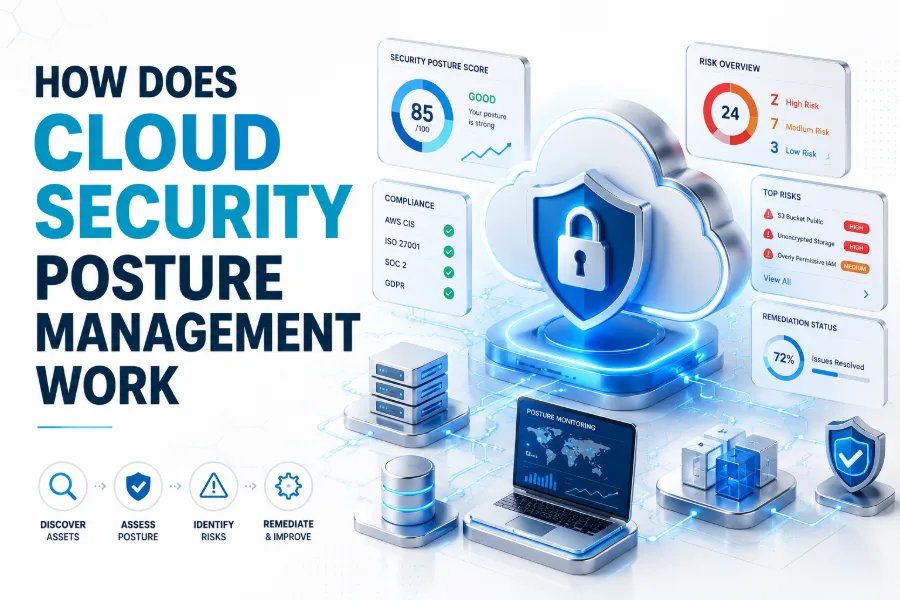
Cloud environments move fast. Teams create servers, databases, storage buckets, containers, identities, and applications across different platforms every day. This speed helps businesses grow, but it also creates security gaps when settings are missed, permissions are too open, or assets are forgotten.
Cloud Security Posture Management, often called CSPM, helps teams understand whether their cloud setup is secure. It continuously checks cloud resources, finds risky configurations, shows compliance gaps, and guides security teams toward practical fixes before problems become larger incidents.
The simple idea behind how does cloud security posture management work is visibility, evaluation, and improvement. CSPM looks across cloud accounts, compares resources against security rules, reports weak areas, and helps teams reduce risk without manually checking every cloud setting one by one.
Cloud Security Posture Management
Cloud Security Posture Management is a security approach that helps organisations manage risk across cloud infrastructure. It focuses on how cloud assets are configured, who can access them, whether they meet security standards, and where the environment may be exposed.
In a traditional data centre, teams could physically track servers and network equipment. In the cloud, resources can appear and change within minutes. CSPM solves this visibility problem by scanning cloud environments and creating a clearer view of what exists.
CSPM does not only search for one type of threat. It looks for misconfigurations, weak access controls, public exposure, missing encryption, poor logging, insecure networks, and compliance issues. This makes it useful for both security teams and cloud operations teams.
Why CSPM Matters in Cloud Environments
Cloud platforms are flexible, but that flexibility can create mistakes. A storage bucket may become public, an admin role may have too many permissions, or a database may be reachable from the internet. Small configuration errors can create serious security risks.
Manual cloud security reviews are difficult because cloud environments change constantly. Developers deploy new workloads, teams test features, and services scale automatically. Without continuous checks, yesterday’s secure setup may become risky after a small update or permission change.
CSPM matters because it gives teams a living view of cloud security. Instead of waiting for an audit or incident, teams can see issues early, prioritise the most important risks, and fix problems before attackers or compliance reviewers find them.
Core Reasons Teams Use CSPM
- To find cloud misconfigurations quickly
- To monitor cloud accounts continuously
- To reduce unnecessary public exposure
- To improve identity and access control
- To support compliance and audit readiness
- To prioritise risks by severity and context
How CSPM Discovers Cloud Assets
The first step in CSPM is asset discovery. A CSPM tool connects to cloud accounts and collects information about resources. These resources may include virtual machines, databases, storage services, serverless functions, containers, Kubernetes clusters, networks, identities, and security groups.
Discovery is important because teams cannot secure what they cannot see. In many businesses, cloud resources are created by different teams across multiple accounts or projects. CSPM helps bring these scattered assets into one central security view.
This discovery process usually runs continuously or on a regular schedule. As new resources appear, the CSPM system adds them to the inventory. When resources change or disappear, the tool updates the view so teams can track the current cloud posture.
How CSPM Checks Cloud Configurations
After discovering assets, CSPM evaluates how those assets are configured. It checks settings against security policies, cloud best practices, internal rules, and compliance frameworks. This helps teams understand whether cloud resources follow expected security standards.
For example, CSPM may check whether storage is public, databases are encrypted, admin access is limited, logs are enabled, or security groups expose risky ports. These checks turn complex cloud settings into clear findings that security teams can review.
Configuration checking is one of the most valuable parts of CSPM. Instead of manually opening every cloud service and checking each setting, teams receive organised findings. This saves time and helps reduce human error during cloud security management.
Common Configuration Issues CSPM Finds
- Publicly exposed storage buckets
- Databases without encryption enabled
- Overly permissive identity roles
- Security groups allowing unsafe access
- Missing logging or monitoring settings
- Unused resources with risky permissions
How CSPM Uses Security Policies
CSPM tools rely on security policies to decide what is safe, risky, or non-compliant. These policies may come from cloud provider best practices, industry standards, regulatory frameworks, or custom rules created by the organisation’s security team.
A policy works like a security expectation. For example, a company may require all cloud databases to use encryption, all admin users to use multi-factor authentication, and all public access to be reviewed. CSPM compares real settings against these expectations.
Custom policies are useful because every business has different needs. A healthcare company, ecommerce store, SaaS platform, and internal business application may not carry the same level of risk. CSPM allows teams to align cloud checks with business context.
How CSPM Detects Misconfigurations
Misconfigurations are one of the most common cloud security problems. They happen when a cloud resource is set up in a risky way. This may happen by mistake, during fast development, through poor defaults, or because a team does not fully understand a setting.
CSPM detects misconfigurations by comparing cloud resources against known safe patterns. If a storage service allows public access, the tool can flag it. If a server allows open access from any IP address, the tool can create a security finding.
The value is not only detection, but early detection. Misconfigurations are easier to fix when they are found quickly. CSPM helps teams catch problems soon after they appear, reducing the time an unsafe setting stays active in the cloud.
Misconfiguration Examples in Cloud Systems
- Public access enabled by mistake
- Weak network firewall rules
- Unencrypted storage or backups
- Excessive admin permissions
- Missing audit logs
- Open management ports
How CSPM Prioritises Security Risks
Not every finding has the same level of importance. A minor policy warning may not need the same response as a public database containing sensitive customer records. CSPM helps teams prioritise risks so they do not waste time on low-impact issues first.
Modern CSPM tools often use severity levels, asset importance, exposure, identity permissions, and data sensitivity to rank findings. This context helps security teams understand which issues create the greatest business risk and should be fixed immediately.
Prioritisation is important because cloud environments can generate many alerts. Without ranking, teams may feel overwhelmed. A good CSPM process helps teams focus on the problems that matter most instead of treating every issue as equally urgent.
How CSPM Improves Compliance
Many businesses must follow security and privacy requirements. These may come from industry standards, customer contracts, internal policies, or government regulations. CSPM helps by checking whether cloud resources align with selected compliance controls.
For example, compliance may require encryption, audit logging, restricted access, secure network design, backup protection, and proper identity management. CSPM can map cloud findings to these controls, making it easier to see where the environment passes or fails.
CSPM does not replace legal or compliance work, but it makes technical compliance easier to manage. It provides evidence, reports, and visibility that help security teams prepare for audits and maintain better cloud governance throughout the year.
Compliance Benefits of CSPM
- Shows policy gaps across cloud accounts
- Connects findings to security controls
- Helps prepare for audits
- Reduces manual evidence collection
- Tracks improvements over time
- Supports stronger cloud governance
How CSPM Handles Identity and Access Risk
Identity is one of the most important parts of cloud security. In cloud environments, permissions control who can create resources, access data, change networks, and manage applications. If permissions are too broad, attackers or careless users can cause serious damage.
CSPM helps identify risky identity settings. It may detect inactive users, overpowered roles, missing multi-factor authentication, unused access keys, public permissions, or service accounts with more access than needed. These findings help teams reduce unnecessary privilege.
Good identity security follows the principle of least privilege. That means users and services should only have the access they need to do their work. CSPM supports this goal by showing where permissions should be reviewed or reduced.
How CSPM Monitors Network Exposure
Cloud networks can become risky when resources are exposed to the public internet without proper controls. A server, database, dashboard, or management port may be reachable from anywhere if a firewall rule or security group is too open.
CSPM checks network settings to find exposure. It may review inbound rules, outbound rules, public IP addresses, load balancers, routing tables, and access paths. This helps teams understand which assets are reachable and whether that access is appropriate.
Network exposure is not always bad. Some services must be public, such as websites and APIs. The goal is to identify unnecessary or unsafe exposure. CSPM helps separate expected access from risky access that should be restricted.
Network Risks CSPM Can Highlight
- Open ports to the public internet
- Databases exposed without restriction
- Admin panels reachable from any IP
- Unused public IP addresses
- Weak segmentation between workloads
- Risky routing or firewall rules
How CSPM Supports Data Protection
Cloud security is closely connected to data protection. Businesses store customer records, payment information, documents, analytics, backups, and application data in cloud services. If these services are misconfigured, sensitive data may become exposed or poorly protected.
CSPM helps by checking encryption, storage permissions, backup settings, public access, logging, and access control. These checks reduce the risk of data leaks and help teams understand where sensitive information may need stronger protection.
For wider data security planning, businesses can also review internal resources such as why is data security important. CSPM protects cloud posture, while broader data security covers how information is collected, stored, shared, and managed.
How CSPM Works Across Multiple Clouds
Many organisations use more than one cloud platform. A business may run applications in AWS, store data in Azure, use Google Cloud for analytics, and rely on SaaS tools for daily operations. Managing all of this manually is difficult.
CSPM helps by creating a central view across different cloud environments. Instead of checking each platform separately, teams can see risks, policies, compliance results, and asset details in one place. This improves consistency across cloud security operations.
Multi-cloud visibility is useful because each provider has different settings, terms, and security models. CSPM helps translate those differences into understandable findings. This gives security teams a clearer way to manage risk across complex environments.
How CSPM Fits into DevOps
Modern cloud teams move quickly. Developers deploy infrastructure through code, test new services, and release updates often. CSPM fits into DevOps by giving security feedback during cloud changes instead of waiting until after systems are live.
When connected to DevOps workflows, CSPM can highlight risky configurations early. Teams may identify problems in infrastructure templates, cloud policies, or deployment pipelines. This helps developers fix issues before they become active risks in production environments.
This approach supports secure development without slowing teams too much. Security becomes part of the workflow rather than a final blocker. Over time, developers learn safer patterns, and cloud environments become more consistent and easier to protect.
CSPM in DevOps Workflows
- Reviews cloud settings after deployment
- Supports infrastructure-as-code checks
- Gives early feedback to developers
- Helps prevent repeated configuration mistakes
- Connects security findings to tickets
- Improves collaboration between teams
How CSPM Automates Remediation
Finding risks is helpful, but fixing them is the real goal. CSPM often supports remediation by giving clear guidance, creating tickets, assigning owners, or triggering automated actions. This helps teams move from awareness to improvement.
Automated remediation must be handled carefully. Some fixes are safe to automate, such as enabling a missing security setting or closing a clearly unused risky rule. Other changes may affect applications and should be reviewed by engineers first.
The best approach is usually a mix of automation and human approval. CSPM can suggest the fix, explain the risk, and route the issue to the right team. This reduces manual effort while keeping important changes under control.
How CSPM Reduces Alert Fatigue
Security teams often deal with too many alerts. Some alerts are important, while others are repetitive, low-risk, or missing context. If everything looks urgent, teams may miss the issues that truly matter. CSPM helps reduce this pressure.
A useful CSPM system groups related findings, ranks severity, adds context, and shows affected resources. It may also suppress accepted risks or ignore findings that do not apply to a specific environment. This makes alerts more manageable.
Reducing alert fatigue improves real security outcomes. Teams can focus on fixing meaningful risks instead of chasing noise. Better context also helps cloud engineers understand why a finding matters and how to resolve it properly.
Ways CSPM Makes Alerts More Useful
- Groups similar findings
- Shows severity and business context
- Highlights internet-exposed assets
- Connects risks to affected resources
- Tracks accepted or ignored risks
- Routes issues to the right teams
How CSPM Reports Security Posture
Reporting is a major part of CSPM. Security leaders need to understand whether cloud risk is improving or getting worse. Engineers need clear tasks. Compliance teams need evidence. Executives need simple summaries that show business-level risk.
CSPM reports may include risk scores, failed controls, exposed assets, compliance status, open findings, fixed issues, and trends over time. These reports help teams communicate security progress in a way that different stakeholders can understand.
Good reporting also supports accountability. When findings have owners and deadlines, teams can track progress more effectively. This turns cloud security from a vague concern into a measurable process with visible improvements and clear responsibilities.
How CSPM Supports Incident Prevention
CSPM is not only useful after something goes wrong. Its main value is preventing issues before they become incidents. By finding weak configurations, excessive access, and exposed assets early, CSPM reduces the chance of cloud breaches.
Prevention is especially important because cloud attacks often begin with simple weaknesses. An exposed storage bucket, leaked access key, public database, or open management port can give attackers a starting point. CSPM helps close these openings faster.
A strong CSPM process does not guarantee perfect security, but it reduces avoidable risk. When combined with monitoring, endpoint protection, identity security, and secure development, it becomes part of a broader cloud defence strategy.
How CSPM Differs from Other Cloud Security Tools
CSPM focuses mainly on cloud configuration, compliance, visibility, and posture. Other tools may focus on workload protection, vulnerability scanning, endpoint security, data security, or runtime threat detection. Each tool solves a different part of the security problem.
For example, a vulnerability scanner may look for outdated software, while CSPM checks whether cloud resources are configured safely. A runtime detection tool may identify active threats, while CSPM helps prevent risky conditions before attackers use them.
Businesses should not expect CSPM to do everything. It works best when combined with other cloud security tools and strong internal processes. Together, these layers create better protection across infrastructure, applications, identities, workloads, and sensitive data.
CSPM Compared with Related Tools
| Security Area | Main Focus |
|---|---|
| CSPM | Cloud configuration and posture |
| CWPP | Workload and runtime protection |
| CIEM | Cloud identity permissions |
| DSPM | Data location and exposure |
| SIEM | Security event collection and analysis |
| Vulnerability Scanning | Software weaknesses and patches |
Best Practices for Using CSPM
To get value from CSPM, teams should start with clear goals. They need to decide which cloud accounts to monitor, which policies matter most, who owns findings, and how quickly different risks should be fixed.
It is better to begin with high-impact controls rather than trying to fix every warning at once. Public exposure, weak identity settings, missing encryption, and critical compliance gaps usually deserve early attention. This creates visible progress without overwhelming teams.
CSPM should also be reviewed regularly. Policies, exceptions, ownership, and reports should match the current business environment. As cloud systems grow, the CSPM process should evolve with new applications, teams, risks, and compliance expectations.
Conclusion
Cloud environments are powerful, flexible, and fast-moving, but they also require constant security awareness. CSPM helps teams manage this challenge by discovering assets, checking configurations, detecting misconfigurations, ranking risks, supporting compliance, and guiding fixes.
The practical answer to how does cloud security posture management work is that it continuously compares cloud resources against security expectations. It then turns complex cloud settings into clear findings that teams can understand, prioritise, and resolve.
CSPM is not a replacement for a full security programme, but it is an important part of modern cloud protection. When used well, it helps businesses reduce avoidable risk, improve visibility, support compliance, and build safer cloud environments over time.
FAQ
What does CSPM mean in cloud security?
CSPM means Cloud Security Posture Management. It is a security approach that helps teams monitor cloud resources, find misconfigurations, check compliance, and improve the overall security condition of cloud environments across one or more platforms.
What problems does CSPM solve?
CSPM helps solve problems such as public cloud exposure, weak permissions, missing encryption, poor logging, insecure network rules, and compliance gaps. It gives teams better visibility and helps them fix risky settings before they become serious incidents.
Is CSPM only for large companies?
No, CSPM can help both small and large organisations. Any business using cloud services can face misconfiguration risks. Smaller teams may benefit because CSPM reduces manual checking and gives clearer guidance for improving cloud security.
Does CSPM fix cloud risks automatically?
Some CSPM tools can support automated fixes, but not every issue should be fixed automatically. Many organisations use CSPM to detect risks, recommend actions, create tickets, and allow engineers to approve important changes before remediation.
How often does CSPM scan cloud environments?
The scanning frequency depends on the tool and setup. Many CSPM systems check cloud environments continuously or on scheduled intervals. The goal is to detect new assets, changed settings, and security gaps as quickly as possible.